Upgrading To Inventory Management Software For Ecommerce
Global ecommerce sales are projected to exceed $6.8 trillion in 2025, and 2.77 billion people are expected to be shopping online. As your business scales, managing inventory manually becomes increasingly difficult. More orders, products, and sales channels lead to errors like stockouts, overselling, and delayed shipments.
The real question is: Can your current manual system keep up with your growing ecommerce business?
For many ecommerce teams, the answer is no. You may find that products are unexpectedly out of stock, orders are delayed, and the same product appears in stock on one platform but is sold out on another. The time spent correcting these mistakes could be better used for scaling your business.
This is where inventory management software for ecommerce becomes essential. In this guide, you’ll discover when to upgrade, the key benefits of an inventory management system, and how to choose the right tool to grow efficiently without unnecessary complexity.
Still Managing Ecommerce Inventory in Spreadsheets? That’s Usually the First Sign You’ve Outgrown Your System
Spreadsheets feel manageable in the early stage. They are familiar, cheap, and easy to start with. For a small catalog and a low order count, they can do the job.
The problem starts when your business grows faster than your process.
Once you sell across multiple channels, inventory changes constantly. A sale on one platform needs to reflect everywhere else. Returns need to be recorded quickly. Purchase decisions need fresh stock data. When all of that depends on manual updates, delays, and mismatches become normal.
That is where manual inventory management starts costing you more than the software you were trying to avoid.
Spreadsheets struggle with multi channel selling
If you sell on your website, marketplaces, social platforms, and even a physical location, stock data can get fragmented fast. One file may show available inventory while another team member is working from an outdated version.
That creates confusion at the exact moment customers expect speed and accuracy.
Small inventory errors turn into expensive business problems
A single missed update can trigger:
-
Stockouts on fast-moving products.
-
Overselling on popular SKUs.
-
Delayed dispatch.
-
Canceled orders.
-
Frustrated customers.
-
Extra support tickets.
Each issue looks small on its own. Together, they hurt trust, increase operational load, and make growth harder to sustain.
The Real Cost of Delaying an Upgrade
Manual inventory tracking usually does not fail all at once. It fails in layers.
- A few missed stock updates create availability mismatches.
- A few mismatches create delayed orders and cancellations.
- A few cancellations increase support load and weaken trust.
Over time, the business begins to lose speed, visibility, and confidence.
This is why accounting software problems are often underestimated. Teams get used to fixing errors manually, so the system appears functional on the surface. But behind that, the cost keeps building.
Here is what poor inventory control often affects first:
Business Area | What Starts Going Wrong | Business Impact |
|---|---|---|
Revenue | Stockouts, overselling, missed sales | Lost conversions and reduced repeat purchases |
Fulfillment | Slower picking, checking, and dispatch | Longer delivery cycles and avoidable delays |
Customer Experience | Cancellations, wrong availability, poor communication | More complaints and lower trust |
Purchasing | Reorders based on guesswork | Overstocking or understocking |
Team Productivity | Manual updates, spreadsheet checks, error correction | Time lost on low-value operational work |
Decision-Making | No live stock visibility | Slower planning and weaker control |
That is why the decision to upgrade should not be framed solely as software adoption. It should be framed as an operating decision.
Ready to move beyond spreadsheets? Start a free trial and see how automated inventory tracking simplifies ecommerce operations.
7 Signs It’s Time to Upgrade to Inventory Management Software for Ecommerce
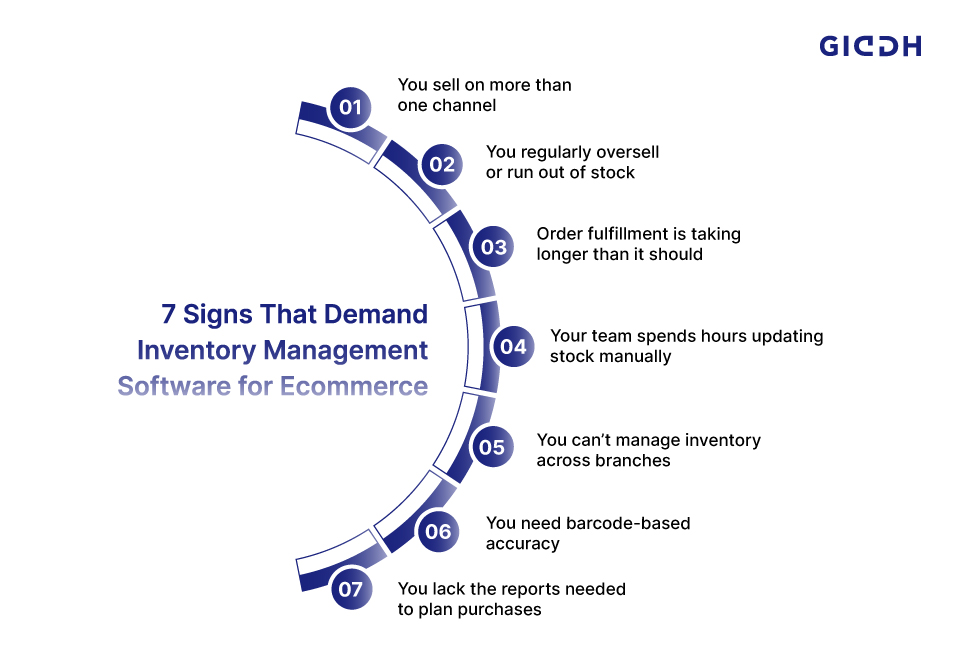
If you are unsure whether now is the right time, these signs usually make the answer clear. Most ecommerce businesses do not upgrade because of one dramatic failure. They upgrade because small inventory issues start showing up more often, across more parts of the business.
At first, the friction feels manageable. A stock mismatch here. A delayed dispatch there. A return that was not updated properly. A warehouse team member checks stock manually before confirming an order. But when these issues recur every day, they stop being minor operational headaches and become a real growth problem.
The point of finance management software for ecommerce is not just to “track stock better.” It is to reduce the hidden operational drag that affects fulfillment speed, customer trust, team productivity, and purchasing decisions.
Here are the signs that usually show a business has outgrown manual inventory control.
1. You sell on more than one channel
The minute you start selling across Shopify, marketplaces, social commerce platforms, and other digital storefronts, stock control gets harder. What used to be a single inventory pool now has to stay accurate across multiple touchpoints simultaneously.
If one channel updates late, the problem does not stay there. A product can appear available on one storefront and sold out on another. A customer may place an order for an item that was already sold elsewhere a few minutes earlier.
That creates friction in three places:
-
The customer experience
-
The fulfillment workflow
-
The support team’s workload
Example:
A fashion brand sells through its own website, Amazon, and Instagram Shop. A fast-selling size sells out on Amazon, but the stock update does not reflect on the brand’s website immediately. Another customer places an order for the same item. The result is an oversold order, a refund, a support ticket, and a disappointed buyer.
A centralized inventory system helps avoid this by syncing stock across channels in near-real time and providing the team with a single source of truth.
What many competitor blogs miss here:
They often say “multi-currency solution sync is useful,” but they do not explain that the real issue is not visibility alone. It is channel conflict. Once stock is shared across platforms, inventory errors become customer-facing errors.
2. You regularly oversell or run out of stock
This is one of the clearest signs that your current process is lagging behind your sales activity. Overselling and stockouts usually mean the business is reacting to inventory movements after they happen instead of managing them as they happen.
Stockouts hurt revenue because customers are ready to buy but cannot. Overselling hurts trust because customers buy, pay, and then hear the product is unavailable. Both outcomes cost more than the missed order itself. They affect repeat purchases, reviews, and brand confidence.
Example:
A home décor store launches a weekend campaign for a best-selling item. Orders spike faster than expected. Since inventory is being tracked manually, the product keeps showing as available longer than it should. By the time the team catches it, several orders need to be canceled.
That is not just an inventory issue. It becomes:
-
a marketing issue because the campaign drove demand the business could not fulfill
-
a CX issue because customers feel misled
-
An operations issue because staff must process refunds and replies
Inventory management software for ecommerce reduces this risk by updating stock automatically after sales and helping teams set low-stock thresholds before the issue becomes visible to customers.
What many competitor blogs miss here:
They mention stockouts and overselling, but they rarely explain the downstream cost. The damage is not only lost sales. It is support burden, refund handling, wasted ad spend, and weaker trust.
3. Order fulfillment is taking longer than it should
If your warehouse or store team spends too much time checking availability, fixing stock mismatches, or confirming inventory before dispatch, your process is already slowing fulfillment.
This often happens when teams do not fully trust the stock numbers in front of them. So they double-check. Then they cross-check with someone else. Then they hold dispatch until the item is confirmed. That delay may only take a few extra minutes per order, but across hundreds of orders, it becomes a major drag.
Example:
An electronics seller gets 150 orders a day. On paper, the team should be dispatching quickly. But because stock records are often slightly off, the warehouse team keeps pausing to confirm whether items are actually available in the correct bin or branch. Packing slows down, dispatch cut-off times get tighter, and same-day shipping becomes harder to maintain.
A better inventory system supports faster fulfillment because the team works with more accurate stock data, barcode validation, and location-based visibility.
Why this matters more than it seems:
Customers do not always know that inventory is the problem. They just experience slower shipping, inconsistent delivery promises, or delayed updates. Inventory friction often hides inside fulfillment problems.
What many competitor blogs miss here:
They treat inventory and fulfillment as separate topics. In reality, poor inventory control is often one of the first reasons fulfillment speed starts slipping.
4. Your team spends hours updating stock manually
Manual entry is not just repetitive. It is fragile. It depends on people remembering every update, every adjustment, every inward entry, every return, and every transfer.
That kind of process can survive at low volume. It becomes risky at scale.
The more transactions your business handles, the greater the risk of missed updates, duplicate entries, and inconsistent records across spreadsheets, systems, and people.
Example:
A small ecommerce team receives fresh inventory in the morning, processes returns in the afternoon, and updates sales data from two marketplaces in the evening. One missed return update and one delayed manual entry are enough to create the wrong stock level by the end of the day.
Manual work also has a hidden cost: it keeps good people stuck doing low-value tasks. Instead of spending time on demand planning, vendor coordination, or process improvement, they spend time correcting stock numbers.
This is often when businesses start looking for an online inventory management system to reduce administrative work, automate stock movements, and improve reliability.
Stronger credibility point to add in this section:
Make it clear that manual work does not fail because teams are careless. It fails because the process depends too heavily on memory, timing, and repeated human actions.
What many competitor blogs miss here:
They talk about “saving time,” but do not explain that the bigger issue is process fragility. When a process depends on manual discipline, growth increases risk faster than teams realize.
5. You can’t manage inventory across branches or warehouses easily
As soon as stock exists in more than one location, visibility becomes essential. Without it, inventory management turns into guesswork.
Teams need to know:
-
what is available in each location
-
which branch should fulfill which order
-
where replenishment is needed
-
whether stock transfers are recorded correctly
Without that visibility, businesses often either overstock one location or understock another. Both outcomes create cost.
Example:
A beauty brand stores fast-moving items in one warehouse and slower-moving products in another. It also keeps some stock at a retail outlet. Because inventory data is not centralized, the team cannot easily see where items are available in real time. One location has excess stock, another is about to run out, and replenishment decisions are made too late.
A strong inventory management software for ecommerce setup makes multi-location control easier by showing stock by warehouse or branch, helping track transfers, and reducing confusion around where inventory actually sits.
Why this matters strategically:
Once a business adds locations, inventory stops being just a stock tracking issue. It becomes a working capital issue. Too much stock in the wrong location ties up cash. Too little stock in the right location hurts sales.
What competitors often miss:
Most blogs mention “multi-location tracking” as a feature, but they do not explain why it matters financially. Better location visibility improves stock allocation, replenishment timing, and cash efficiency.
6. You need barcode-based accuracy
A barcode workflow in an inventory management system speeds up stock handling and reduces entry errors. It helps with receiving, picking, billing, stock checks, and dispatch.
This matters because once order volume rises, typing product codes manually becomes both slow and error-prone. Barcode-based workflows create more consistency in day-to-day inventory movement.
Example:
A growing apparel store receives dozens of SKUs in multiple sizes and colors. During peak season, manually selecting the wrong variant becomes easy. One wrong entry creates incorrect stock records and may even lead to the wrong item being shipped. Barcode scanning reduces that risk by making item identification faster and more accurate.
Barcode support becomes even more useful when a business handles:
-
high SKU counts
-
many product variants
-
regular inward and outward stock movement
-
frequent stock audits
What stronger credibility looks like here:
Do not present barcode scanning as a flashy feature. Present it as a control layer. It helps reduce avoidable mistakes in repetitive warehouse work.
What competitors miss:
Many articles mention barcode features, but they do not connect them to operational discipline. Barcode support is not just about speed. It is about reducing mis-picks, mismatched variants, and inaccurate stock records.
7. You lack the reports needed to plan purchases
If reordering depends on guesswork, growth becomes risky. Businesses need visibility into stock movement, fast sellers, slow sellers, dead stock, low-stock items, and location-wise inventory performance.
Without proper reporting, purchasing becomes reactive. Teams order too late, too early, or in the wrong quantity.
Example:
A business sees one product category selling well overall, so it places a large reorder. But without movement-level reporting, the team misses that only a few variants are moving fast while others are sitting. The result is avoidable overstock on slow-moving items and understock on the products customers actually want.
This is where inventory reporting becomes more than a dashboard feature. It supports:
-
smarter reordering
-
better product planning
-
reduced excess inventory
-
stronger cash flow decisions
A strong system should help teams answer practical questions like:
-
Which items are moving fastest?
-
Which products are aging in stock?
-
Which locations need replenishment first?
-
What should be reordered now versus later?
What Inventory Management Software for Ecommerce Actually Solves
The best software does more than store numbers in one place. It improves how inventory moves through your business every day.
Real time stock visibility
This is one of the biggest inventory management system benefits. You can see what is in stock, where it is stored, and what is committed to orders without chasing files or asking different teams.
That matters because ecommerce runs on timing. Customers do not wait for back office updates.
Automatic stock updates after every sale
A strong cloud based accounting software setup reduces the gap between what is sold and what your system shows as available. That lowers the risk of overselling and improves channel accuracy.
Faster and more accurate order fulfillment
When stock data is clean, the fulfillment process gets smoother. Teams spend less time checking and rechecking availability. Picking, packing, and dispatch move with fewer interruptions.
Better planning and purchasing
Good inventory software helps you reorder based on actual demand, not assumptions. It gives you better control over stock levels and reduces both understocking and overstocking.
Easier scaling
Growth creates complexity. New channels, product variants, warehouse locations, and order volume all multiply the number of moving parts. A good inventory management software for ecommerce helps you grow without adding the same level of manual effort.
Which Inventory Management System Features Matter Most for Ecommerce
Not every tool is built for ecommerce operations. Some systems look fine on paper but fail when real order volume, product variation, and multi channel selling come into play.
Here are the inventory management system features worth prioritizing.
Multi channel inventory sync
If your stock moves across multiple sales channels, synchronization is not optional. It is the core of inventory accuracy.
Barcode support for speed and control
An inventory management system's barcode feature helps teams scan products quickly, reduce manual data entry, and manage stock with greater confidence.
Multi location and warehouse tracking
Growing stores often need inventory visibility across branches, warehouses, or fulfillment points. The system should make stock movement easy to track, not harder.
Product variants and inventory organization
If you sell products in different sizes, colors, packs, or configurations, your software should support variants cleanly. Product structure matters more than many teams expect.
Reporting that helps you act
You need reports you can actually use. That includes stock summary, movement trends, low stock alerts, location wise tracking, and purchase planning insights.
Ecommerce integrations
Your best inventory management system should work with the platforms you already use. Integration matters because disconnected systems simply recreate the same problem in a different format.
Ease of use
A tool should help your team move faster, not create a new layer of training and confusion. Strong features matter, but so does usability.
Why Giddh Is a Practical Upgrade for Growing Ecommerce Businesses
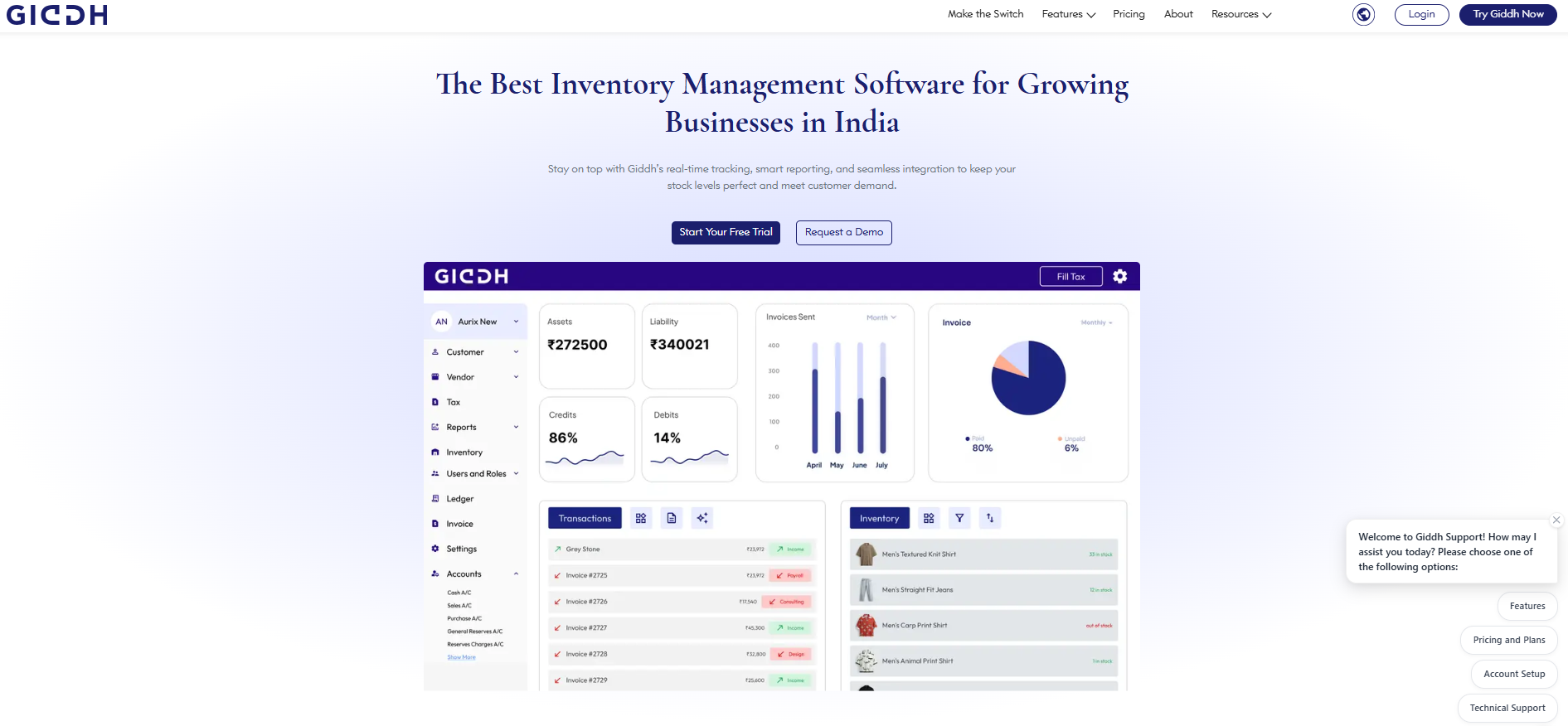
If your business is moving from spreadsheet-based tracking to a more controlled inventory process, Giddh is a practical upgrade at that stage.
Its inventory management software includes:
-
A Centralized Inventory Hub.
-
Barcode Scanning.
-
Product Variant Tracking.
-
Branch And Warehouse Inventory Management.
-
Stock Transfers Between Locations.
-
Custom Units.
-
Inventory Reporting
-
Integrations With Shopify, WooCommerce, And Other Popular Platforms.
That matters because these are not random features. They align directly with the problems growing ecommerce teams face first.
Centralized stock visibility
Giddh’s inventory masters are positioned as a centralized hub for viewing, managing, and organizing inventory. That supports cleaner control as catalogs and teams grow.
Better handling of product variation
The platform supports variants such as size, color, and design, which is important for stores with more complex product structures.
Barcode-enabled workflows
Barcode scanning can reduce manual entry and improve handling speed, which helps teams reduce avoidable stock errors.
Multi-location inventory control
Giddh supports branch and warehouse inventory management, company-wide and branch-specific reporting, and stock transfers between locations. That makes it relevant for businesses expanding beyond a single stock point.
Regional fit for businesses in India
If your search includes an inventory management system in India, Giddh is a clear fit for that market and speaks directly to SMEs and ecommerce businesses operating in India.
For businesses that have already outgrown manual stock handling but do not want unnecessary system complexity, Giddh is worth evaluating as an online, centralized inventory management system for ecommerce operations.
Conclusion
Manual inventory tracking usually fails in stages, not all at once.
A few delayed updates become stock mismatches.
A few mismatches become canceled orders.
A few canceled orders become lost revenue, more support issues, and weaker customer trust.
That is why the right time to upgrade is usually earlier than teams expect.
The right inventory management software for ecommerce gives you better visibility, cleaner operations, faster fulfillment, and better control over purchasing as order volume grows. More importantly, it helps the business scale without adding the same level of manual effort and avoidable confusion.
If your store is reaching the point where spreadsheets are slowing down fulfillment, creating stock inaccuracies, or making planning harder, this is the right time to review your inventory process seriously.
Map your current pain points, identify the operational bottlenecks hurting growth, and choose a system that supports the way your business actually sells..
Start a free trial of Giddh and see how automated inventory tracking can simplify your ecommerce operations.
FAQ
Is inventory management software worth it for small ecommerce businesses?
Yes. It becomes valuable as soon as manual tracking starts causing stock errors, delays, or wasted team time. The benefit often appears before the business becomes large.
What is the best inventory management system for a growing online store?
The best inventory management system is one that supports your sales channels, updates stock automatically, handles variants and locations properly, and gives you reports you can act on.
Can inventory management software work with Shopify or WooCommerce?
Yes. Many ecommerce-focused tools integrate with storefront platforms. Giddh states that it integrates with Shopify, WooCommerce, and other popular platforms.
Why is barcode support important in inventory management?
Barcode support improves speed and reduces manual entry mistakes. It helps teams handle stock more accurately during receiving, checking, billing, and order processing.
Is cloud-based inventory management software better than spreadsheets?
For growing teams, usually yes. A cloud-based inventory management software setup gives better visibility, easier access, faster updates, and smoother collaboration than static files.
 Download
  Download