Best Invoice Automation Software for AP Cost Reduction
Did you know that businesses can spend up to $15 per invoice when handling invoice processing manually? This staggering figure doesn’t just account for labor costs; it also reflects hidden expenses such as late payments, errors, and workflow inefficiencies.
As organizations grow, these costs can quickly add up, prompting many finance decision-makers to adopt invoice automation software to streamline operations and reduce costs.
If your business still relies on manual invoice processing, it’s time to reconsider your approach. The best invoice automation software can not only help you cut down on expenses but also enhance visibility, reduce human error, and speed up the invoice cycle. But with so many tools available, how do you choose the right one?
Let’s explore how automation can solve the problems that plague many AP departments and how it can lead to significant cost savings.
Why Manual Invoice Processing Costs More Than You Think
When businesses rely on manual invoice processing, they face numerous challenges that can drive up operational costs. Below are some of the key issues associated with manual invoice processing:
-
High Labor Costs: Manually processing invoices is labor-intensive, especially when handling hundreds or thousands of invoices each month. This consumes valuable time and resources, increasing your operating expenses.
-
Risk of Errors: Manual data entry is error-prone, leading to payment discrepancies, missed payments, and compliance issues.
-
Delayed Payments: Manual workflows often create bottlenecks in approval processes, delaying payments. Late payments can lead to late fees and strained relationships with suppliers.
-
Lack of Visibility: With manual processes, tracking an invoice's status can be cumbersome. This lack of visibility can delay payments and lead to poor cash flow management.
These inefficiencies translate directly into higher operational costs and can hinder your organization's growth.
Key Features of the Best Invoice Automation Software
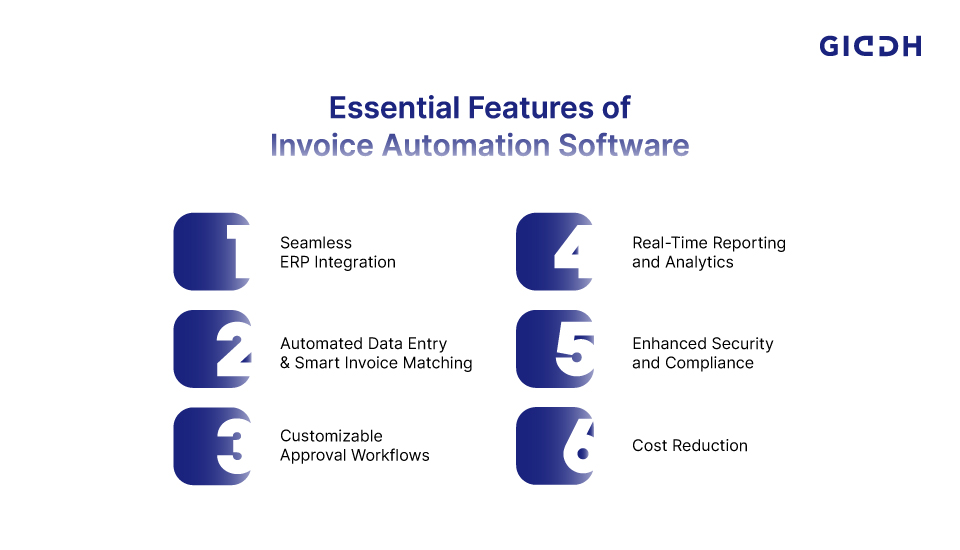
The best invoice automation software comes with several features designed to address the common challenges in manual AP processes. Below are some critical aspects to look for when choosing the right tool for your business:
Seamless ERP Integration
Invoice automation tools should easily integrate with your existing ERP system, ensuring smooth synchronization of financial data. This integration is crucial to maintaining consistency across departments, preventing manual entry errors, and ensuring that your accounting records are up to date.
Automated Data Entry & Smart Invoice Matching
With AI-driven automation, invoices are automatically matched to purchase orders and receipts. This reduces the need for manual verification and minimizes the risk of errors, making the process faster and more accurate.
Customizable Approval Workflows
The best invoicing software lets you set up custom approval workflows, ensuring invoices are reviewed and approved in line with your business rules. This accelerates the approval process and reduces bottlenecks.
Real-Time Reporting and Analytics
With automated invoicing, you get access to real-time insights into your accounts payable processes. Dashboards and reports provide actionable data to help you make informed decisions and optimize your cash flow management.
Enhanced Security and Compliance
Invoice automation software provides advanced security features, including encryption and access controls, to protect sensitive financial data. It also ensures compliance with industry regulations, such as GST and e-invoicing standards.
Cost Reduction
Automating the invoice processing cycle reduces labor costs and minimizes errors that lead to costly rework. Studies show that automation can reduce invoice processing costs from $15 to $1 or less, making it a game-changer for businesses looking to reduce AP costs.
How Invoice Automation Helps Reduce AP Costs
When businesses move to automated invoice processing, they can expect significant cost savings across several areas of their accounts payable function. Here’s how:
1. Reduces Manual Labor Costs
The time saved by automating invoice entry and matching tasks can free up valuable resources within your AP department. Instead of spending hours manually entering data, employees can focus on more strategic activities that contribute to the business’s bottom line.
2. Reduces Errors and Rework
Manual processes are prone to mistakes, but invoice automation software minimizes human error by automatically checking for discrepancies, duplication, and incorrect entries. This reduction in errors eliminates the need for costly corrections and reduces the risk of paying incorrect amounts or missing invoices.
3. Speeds Up the Payment Process
By automating approval workflows and invoice matching, invoices are processed much faster. This reduces the time it takes to approve payments, ensuring your suppliers are paid on time and you avoid late payment fees.
4. Streamlined Approval Workflows
Invoice automation enables you to set up automated reminders for approvers and supervisors, ensuring invoices are reviewed and approved promptly. Faster approvals translate to quicker payments, which can improve cash flow and strengthen supplier relationships.
5. Better Cash Flow Management
With real-time financial reporting and visibility into the accounts payable process, businesses can optimize payment scheduling and cash flow management. This means paying suppliers on time without incurring liquidity issues, thereby improving financial stability.
Giddh: Smart Invoice Automation for Faster AP Cost Savings
When it comes to choosing the best invoice automation software for your business, Giddh stands out as a powerful solution with robust features, an intuitive design, and seamless integration capabilities. Here’s why Giddh is the ideal choice for reducing accounts payable (AP) costs while increasing operational efficiency:
Integration with Existing ERP Systems
One of the key reasons Giddh excels in the market is its seamless integration with popular ERP systems. Whether you use SAP, Oracle, or other ERP software, Giddh ensures your financial data remains synchronized and consistent across departments, reducing the risk of errors and improving visibility.
-
Smooth Integration: Giddh integrates seamlessly with your existing ERP system, enabling easy data synchronization across business functions.
-
Centralized Data Management: With integrated data, you can access real-time updates and streamline the entire accounts payable process.
-
Prevents Manual Errors: By automating data transfers, Giddh eliminates manual entry errors that often occur when entering data across multiple systems.
-
Optimized Workflows: Integrated systems enhance workflows, allowing you to manage invoicing without leaving your main ERP platform.
AI-Powered Invoice Matching
With Giddh’s AI-driven invoicing automation, the software uses machine learning to automatically match invoices to purchase orders and receipts. This feature significantly reduces manual verification time and ensures accuracy throughout your entire AP process.
-
Automatic Matching: AI-powered matching accelerates the process by identifying discrepancies between invoices and purchase orders.
-
Reduces Errors: Machine learning algorithms help minimize human error, ensuring only correct, validated invoices are processed.
-
Increases Efficiency: By eliminating manual invoice verification, Giddh accelerates the payment cycle and reduces processing time.
-
Improves Accuracy: AI ensures precise matching, even when data discrepancies exist, preventing overpayments or missed invoices.
Customizable Approval Workflows
Whether you’re a small business or a large enterprise, Giddh allows you to customize your approval workflows to meet your specific business needs. Custom workflows help optimize the approval process, reducing bottlenecks and accelerating invoice processing times.
-
Tailored Approval Chains: You can define multiple approval levels based on invoice size, department, or other customizable rules.
-
Automatic Approval Reminders: Giddh sends automated reminders to approvers, ensuring invoices are processed promptly.
-
Multi-User Access: Multiple team members can participate in the approval process, enhancing collaboration and expediting the workflow.
-
Audit Trail: Track the progress of each invoice approval in real time, enabling you to pinpoint delays and manage exceptions.
Real-Time Analytics and Insights
With powerful dashboards and reports, Giddh offers real-time analytics to help you track and optimize your accounts payable process. These insights allow you to make data-driven decisions that improve your AP workflow and reduce costs.
-
Customizable Dashboards: Tailor your dashboard to focus on the metrics that matter most to your business, such as pending payments, overdue invoices, and supplier performance.
-
Comprehensive Reports: Generate detailed reports on your AP performance to help you identify cost-saving opportunities.
-
Data-Driven Decisions: By having access to real-time data, you can identify inefficiencies, forecast cash flow needs, and optimize your AP operations.
-
Cost Optimization: With insights into approval timelines and payment trends, you can pinpoint opportunities to reduce AP costs, such as optimizing payment schedules or eliminating delays.
Security and Compliance
Security is a top priority at Giddh, with advanced features that ensureyour financial data is fully protected. Additionally, Giddh helps with essential regulatory requirements, such as GST and the e-invoicing process.
-
Data Encryption: Giddh uses the latest encryption technology to protect sensitive financial data, keeping your information secure at all times.
-
User Authentication: Access control measures ensure that only authorized users can view and approve invoices, adding an extra layer of security to your process.
-
Regulatory Compliance: Giddh automatically ensures compliance with tax regulations, such as GST invoicing, helping your business avoid penalties.
-
Audit Trail for Transparency: Maintain a comprehensive audit trail for every invoice to ensure compliance and support internal auditing.

How to Choose the Best Invoice Automation Software for Your AP Needs
When evaluating the best invoice automation software for your business, consider the following factors:
-
Ease of Integration: Ensure the software integrates seamlessly with your existing ERP or accounting system to ensure smooth data synchronization.
-
User-Friendly Interface: The software should be easy for your team to use and require minimal training.
-
Customization Options: Look for software that offers customizable workflows to suit your business’s unique needs.
-
Security Features: Ensure the software provides robust encryption and data protection to safeguard your financial data.
-
Scalability: Choose a tool that can grow with your business and scale with your AP needs.
Conclusion:
The financial benefits of invoice automation cannot be overstated. From reducing manual labor to cutting down on errors and accelerating the payment cycle, the best invoice automation software delivers clear ROI. By investing in the right solution, your business can save time and money, enabling you to focus on more strategic activities while maintaining accurate, timely financial records.
If you're ready to transform your AP processes, start your free trial of Giddh’s invoice automation software today and see the cost reduction benefits for yourself. Don’t let manual invoice processing hold you back—automate, streamline, and save.
FAQ:
1. What is invoice automation software?
Invoice automation software automates the entire process of receiving, processing, and paying invoices. It eliminates manual data entry, speeds up approval workflows, reduces errors, and ensures timely payments.
2. How does invoice automation reduce AP costs?
Invoice automation reduces AP costs by eliminating manual labor, minimizing errors, speeding up invoice approvals, and enhancing overall workflow efficiency. These factors together result in lower operational expenses and faster processing.
3. Which is the best invoice automation software for small businesses?
For small businesses, the best invoice automation software should be affordable, easy to integrate with existing systems, and offer features such as automated data entry and customizable workflows. Giddh is a great option for small businesses looking to streamline their AP processes.
4. Can invoice automation software integrate with my existing ERP system?
Yes, most leading invoice automation software, including Giddh, integrates seamlessly with existing ERP systems, ensuring that your financial data stays synchronized across all platforms.
 Download
  Download