Profit and Loss Software for Accurate Monthly Reporting
Small businesses still handle accounting manually, which often leads to costly errors and missed opportunities. How much time do you spend trying to pull together accurate financial data each month? If your answer is "too much," you’re likely part of the businesses facing this challenge.
Without real-time, reliable insights into your profit and loss, it's almost impossible to make informed decisions that drive your business forward. That’s where profit and loss software comes in, offering a solution that automates this critical task, ensuring your financial reports are accurate and on time.
Whether you’re a small business owner or a financial manager, investing in the right tool can save you time, reduce mistakes, and help your business grow. Let's explore why this software is a game-changer for managing business finances.
What is Profit and Loss Software?
Profit and loss software is a tool designed to automate the process of generating profit and loss statements for your business. These reports summarize your income, expenses, and profits over a given period, helping you track financial health and make informed decisions. Rather than manually calculating every transaction, profit and loss software pulls data directly from your financial reporting systems to ensure accuracy.
Core Functionality
Most profit and loss software integrates with accounting tools, payment platforms, and bank feeds. This integration ensures your financial data is always up to date and automatically pulled into your reports. The software then generates a detailed and accurate profit and loss statement that can be reviewed and shared with stakeholders.
Cloud-based bookkeeping solutions like Giddh provide a host of features that improve business operations. To explore the best features of cloud-based bookkeeping, check out this guide.
Why It's Essential for SMBs
Small to medium-sized businesses (SMBs) often face challenges in manual financial reporting. These businesses are typically resource-constrained and lack dedicated financial departments.
For SMB owners or managers, manually tracking profits, expenses, and cash flow is time-consuming and error-prone. Profit and loss software simplifies this process, offering a streamlined solution for financial management.
Why Accurate Monthly Reporting Matters for Your Business
Informed Decision-Making
Without accurate monthly reports, it’s nearly impossible to make timely decisions that align with the financial goals of your business. Real-time insights into revenue and expenditures allow business owners to adjust operations, allocate resources effectively, and stay ahead of financial challenges.
- Example: If you notice that a product line isn’t performing as expected, you can take swift action, like cutting production costs or marketing spend, based on your P&L statement.
Financial Control and Cost Management
Accurate reports help you track your expenses more effectively. By reviewing your monthly P&L statement, you can identify unnecessary costs, improve cash flow, and optimize your overall budget.
- Example: A review of your monthly reports could highlight an increase in operational costs that can be reduced by renegotiating supplier contracts.
Tax Compliance and Planning
Accurate monthly profit and loss reports ensure that you are always prepared for tax filing. With real-time insights into profits and expenses, you can stay compliant with tax laws and avoid any unpleasant surprises at the end of the year.
- Example: With up-to-date P&L reports, you’ll know exactly how much tax you owe and can plan ahead without scrambling at the last minute.
In addition to P&L reports, GST compliance software helps businesses stay compliant with tax laws and be prepared for scrutiny notices.
Learn more about how it can help you stay tax-ready here
Templates vs Profit and Loss Statement Software
Many businesses start their financial reporting journey with Excel or Google Sheets templates. These tools offer flexibility but have significant limitations, especially as businesses scale.
According to a 35-year meta-analysis of spreadsheet studies, 94% of spreadsheets exhibit structural or calculation faults, primarily due to non-technical users creating complex financial models without formal training. While templates can work for smaller operations, they quickly become problematic as businesses grow.
Templates require manual data entry, lack real-time updates, and become increasingly difficult to manage as business structures become more complex. Over time, the inefficiencies and risks of human error outweigh their initial simplicity. This is where dedicated profit and loss software steps in, offering a more robust, scalable solution that ensures accurate, timely financial reporting.
Here’s a comparison between Profit and Loss Templates and Dedicated P&L Software:
Feature | P&L Templates | Dedicated P&L Software |
|---|---|---|
Data Integration | Manual copy/paste | Automated from multiple sources |
Automation | Minimal (formulas only) | Partial to comprehensive automation |
Error Prevention | Manual checks | Built-in validation and error controls |
Collaboration | Limited (file sharing) | Real-time multi-user access |
Scalability | Poor (cumbersome as business grows) | High (adapts to growing businesses) |
Free Profit and Loss Software Options:
Free software solutions exist, but often provide limited functionality. They may be useful for very small businesses or as a starting point, but they fall short on the advanced features required for more complex operations. As your business grows, free tools will quickly become inadequate.
Evaluating P&L Management Software for Complex Needs
Handling Multiple Business Entities
For businesses with multiple departments or locations, profit and loss software should be able to manage complex financial structures and generate reports for each entity or location. This functionality ensures that your financial insights are accurate and specific.
Advanced Reporting Features
As your business grows, you may require more detailed reporting. Look for software that offers advanced features, such as multi-dimensional reporting by department, project, or region, to gain deeper insights into your financial performance.
In addition to generating detailed P&L reports, businesses with inventory needs should consider the inventory management features of software that integrates with their financial tools.
Discover the 5 features to look for here-
Security and Compliance
Data security is critical, especially when dealing with financial information. Make sure the software you choose complies with financial regulations and has robust security measures to protect sensitive data.
Support and Integration
Strong customer support is vital when implementing new software. Ensure the software provides 24/7 support and integrates seamlessly with your existing tools, such as accounting and enterprise resource planning (ERP) systems.
Step-by-Step: Creating Accurate Reports with a Profit and Loss Program
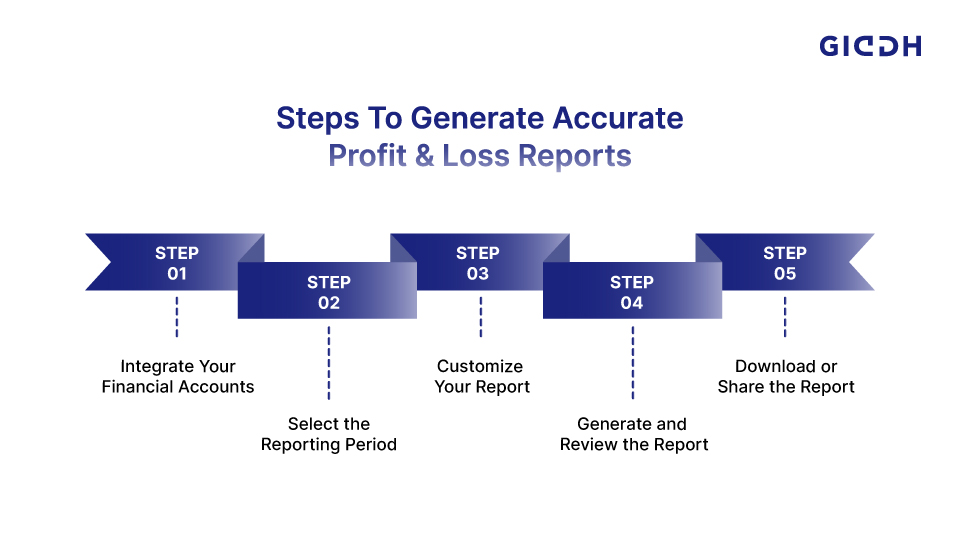
Creating accurate profit and loss (P&L) reports with the right software can be a game-changer for your business. These reports provide crucial insights into your company’s financial health, allowing you to make informed decisions and strategize for the future. Below is a step-by-step guide to help you generate accurate P&L reports using profit and loss software.
Step 1: Integrate Your Financial Accounts
To generate an accurate P&L report, the first step is to connect all your relevant financial accounts. This ensures the software pulls accurate, up-to-date data directly from your accounting system, bank accounts, and payment platforms.
-
Sync bank accounts: Ensure your business's bank accounts are connected so that all transactions are automatically recorded.
-
Integrate payment platforms: If you use payment processors (like PayPal, Stripe, or Square), integrate them to capture income and expenses accurately.
-
Automatic updates: By connecting these accounts, your data will be updated automatically, reducing manual entry and improving accuracy.
Integrating your accounts saves you time and ensures that your P&L statement reflects real-time financial data.
In addition to connecting your bank accounts and payment platforms, Giddh simplifies invoicing, allowing you to manage all your financial tasks in one place.
Learn how Giddh streamlines digital invoicing here
Step 2: Select the Reporting Period
The next step is to determine the reporting period for your P&L statement. The frequency of your reports will depend on your business’s needs and the level of detail you require.
-
Choose monthly, quarterly, or yearly: Most businesses opt for monthly reports to keep a close eye on finances, but quarterly or yearly reports may be more suitable for businesses with a stable financial cycle.
-
Consider business seasonality: If your business experiences fluctuating sales during certain seasons, you might need to generate reports during those peak or low periods.
-
Flexibility: Many software solutions allow you to easily adjust reporting periods based on your preferences, giving you the flexibility to analyze financial data at any given time.
This step is essential for aligning your financial reporting with your business’s natural rhythms.
Step 3: Customize Your Report
Once you’ve selected the reporting period, the next step is to tailor the P&L report to meet your specific business needs. Customization is key to ensuring the report captures the right details and provides actionable insights.
-
Adjust income and expense categories: Modify categories based on your business model. For example, a service-based business might need categories like "consulting fees" or "service expenses," while a product-based business could have categories like "cost of goods sold" or "inventory costs."
-
Include specific financial details: Some businesses require detailed breakdowns of certain expenses, such as marketing or payroll. Customize your report to display these metrics.
-
Create tailored views: If your business operates in multiple locations, departments, or projects, set up custom views to show P&L data for each specific segment.
-
Add comparisons: Some software allows you to compare current P&L data with past reports, helping you track growth and identify trends.
By customizing the report, you can ensure that it provides relevant information tailored to your business’s unique needs.
Step 4: Generate and Review the Report
Once the report is customized, the software will generate the P&L statement. However, before sharing or using it for decision-making, it's essential to review the report thoroughly.
-
Double-check for discrepancies: Even with automated systems, there can sometimes be data discrepancies. Look for any inconsistencies or unexpected numbers.
-
Verify income and expenses: Ensure that all income and expenses are correctly categorized, especially for variable or one-time transactions.
-
Look for anomalies: Review the margins and key performance indicators (KPIs) for any signs of unusual spending or income.
-
Cross-check with previous reports: Compare the current P&L report with historical data to ensure consistency and accuracy.
This step is crucial to ensure the report reflects your business's financial health accurately and that there are no mistakes or omissions.
Step 5: Download or Share the Report
After reviewing and finalizing your P&L statement, it’s time to download or share the report with stakeholders, investors, or management. Most P&L software allows for easy sharing and downloading, making this process quick and convenient.
-
Download the report: Most platforms offer downloadable formats like PDF, Excel, or CSV, making it easy to archive and print reports.
-
Share with stakeholders: Share the report directly with investors, accountants, or other stakeholders. Many software solutions allow for email sharing or sharing via a secure online portal.
-
Present the data: Some platforms provide built-in presentation tools, enabling you to create graphs or visual representations of your financial data for easy interpretation by others.
-
Store for future reference: Ensure you store reports properly for compliance and audit purposes. Cloud-based platforms offer easy storage and retrieval.
This step ensures that everyone who needs to see your business’s financial health has access to accurate and up-to-date information.
Giddh: The Solution for Effortless Financial Reporting
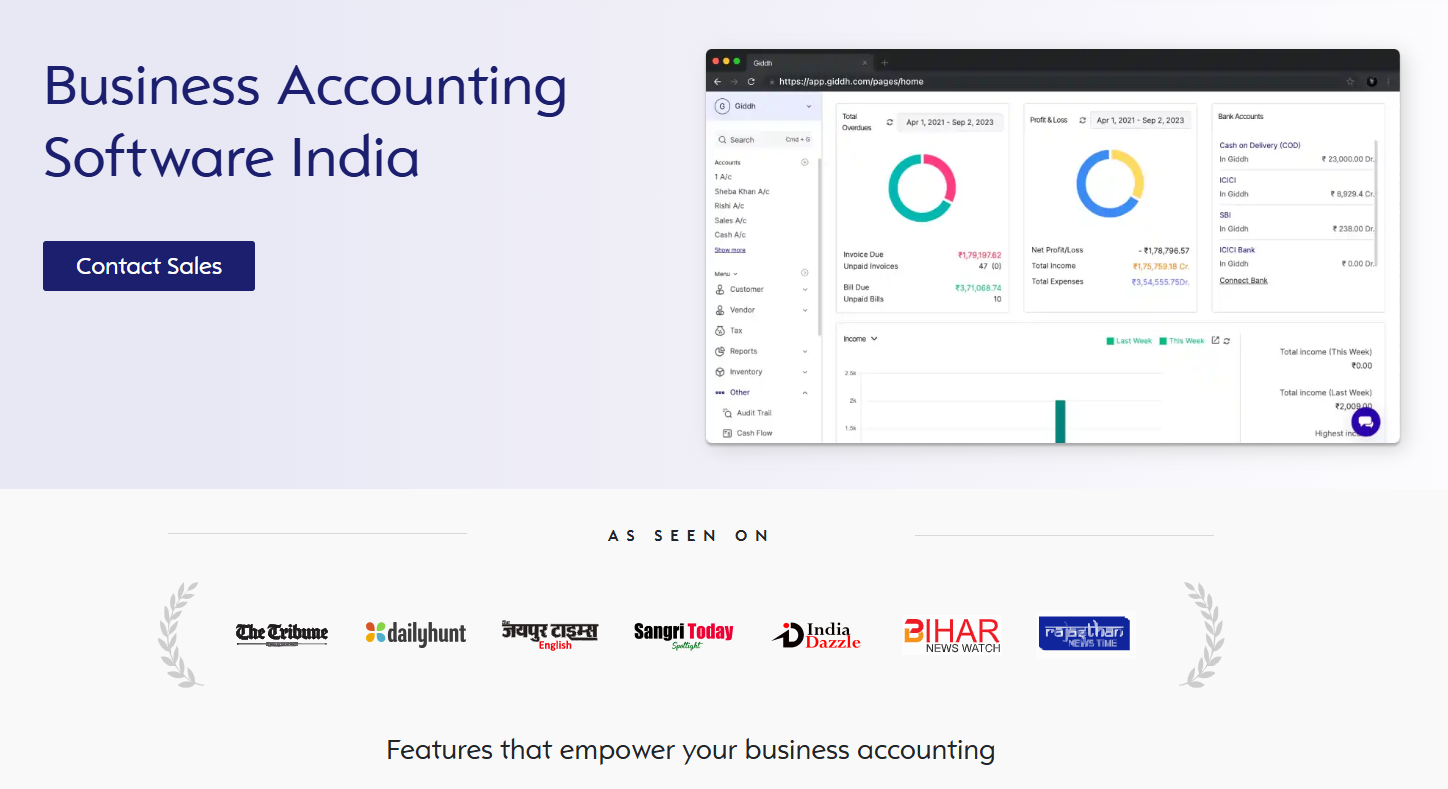
Giddh offers powerful profit and loss software free that automates monthly reporting, integrates seamlessly with your financial tools, and provides real-time insights. With its easy-to-use interface, Giddh eliminates manual errors and streamlines your financial workflows, allowing you to focus on growing your business.
Key Benefits of Giddh
- Seamless Integration: Connects with your existing accounting software for accurate, real-time financial reporting.
- Real-Time Insights: Access up-to-date P&L reports at the click of a button, enabling informed decision-making.
- User-Friendly Interface: Even non-financial managers can easily navigate the software.
With Giddh, you no longer have to worry about manual errors, time-consuming reports, or missing key financial details.

Conclusion
Accurate and timely profit and loss reports are essential for small and medium-sized businesses to thrive. With the right profit and loss software, you can streamline your financial reporting process, reduce human errors, and gain real-time insights that drive smarter business decisions.
Ready to transform your financial reporting? Try Giddh’s Profit and Loss Software today for a free demo!
FAQ
1. What is the best profit and loss software for small businesses?
The best software depends on your specific needs. Giddh is ideal for SMBs seeking seamless integration, real-time reporting, and an easy-to-use interface.
2. Can I use profit and loss software for free?
Yes, some profit and loss software offers free versions with basic features. However, paid versions offer more advanced features, including automation, customization, and integrations.
3. How can profit and loss software help with decision-making?
It provides real-time financial data to help you make informed decisions about spending, investments, and operational changes.
4. How can I download profit and loss statement?
Most software, including Giddh, allows you to easily download profit loss statement in formats such as PDF for sharing and printing.
 Download
  Download